Your own MCP server product, with your name on it
The White Label add-on puts your name, logo, icon and colours on GetMCP. Your clients see your product in the admin, on the screen where they approve an AI client, and in every alert email, on WordPress and on the standalone app.
Sell AI access as your own product
Agencies already run GetMCP for their clients: an MCP server for the client's store, their CRM, their database. With White Label that install stops saying GetMCP. It carries the product name you choose, so what you hand over is your product, supported by you.
- One Branding screen: name, tagline, company, links, logos, icon and accent colour
- Fields you leave empty keep GetMCP's defaults, so you can change only the name
- Your servers, tools, connections and API keys work exactly as before
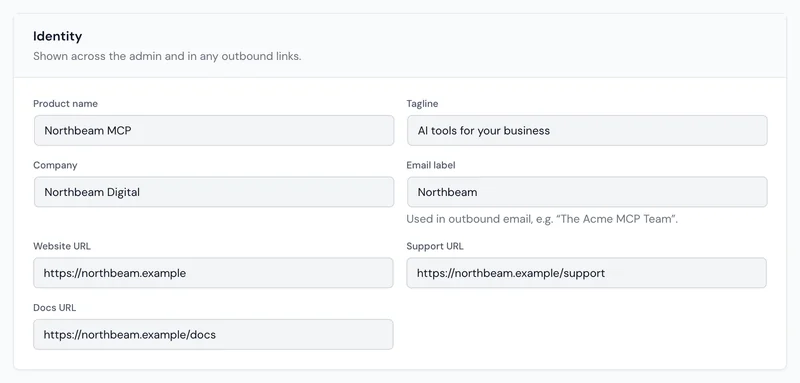
Everywhere GetMCP would have shown its own name
Save once and the brand applies across the install, including the screens your client's team sees when they connect an AI client.
The admin
Your product name and tagline in the sidebar, your icon in the menu and the browser tab, page titles under your name, and your accent on every button and link.
The consent screen
When someone connects Claude, ChatGPT or Cursor, the screen that asks them to approve it shows your name, your mark and your colours.
Alert emails
Emails the install sends carry your product name, and their subjects start with your short email label, such as [Northbeam].
The standalone login
On the standalone app, the sign-in and setup screens show your logo. Upload one for light backgrounds and one for dark.
Your links
Your website behind the logo and footer credit, your support page on error screens, and your docs in the help links and the documentation link published to AI clients.
The built-in AI server
The server that lets Claude or Cursor manage the install introduces itself by your product name, not ours.
One colour in, a whole palette out
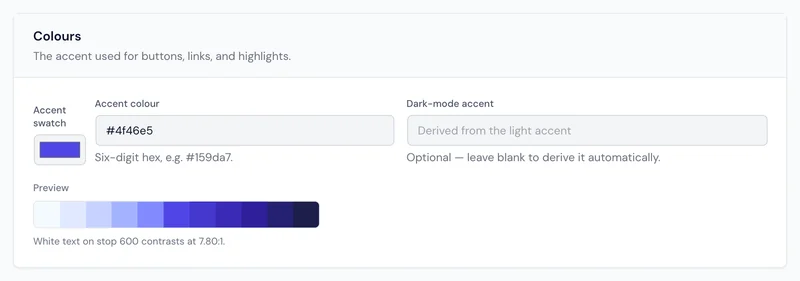
Enter your brand colour and GetMCP builds every tint and shade the interface needs from it, plus a matching accent for dark mode. The preview checks that white text on your buttons stays readable, and says so when a colour is too light.
- Logos and icon in PNG, JPEG, WebP or SVG
- Light and dark previews for every upload, so a logo never disappears on one background
- Uploaded files are stored on your own install
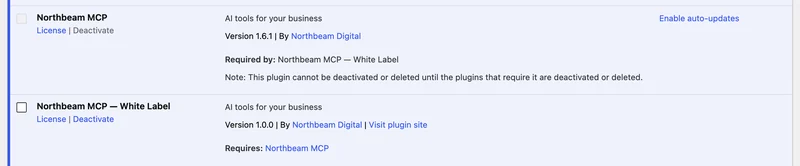
On WordPress, the Plugins screen too
Turn on one option and the Plugins screen lists GetMCP under your product name, with your company as the author and your tagline as the description. Its update notices and licence reminders use your name too.
Version numbers, download links and licence checks are left exactly as they are, so updates keep working. The one screen WordPress does not let a plugin rename is Dashboard → Updates, which shows the real names while an update waits.
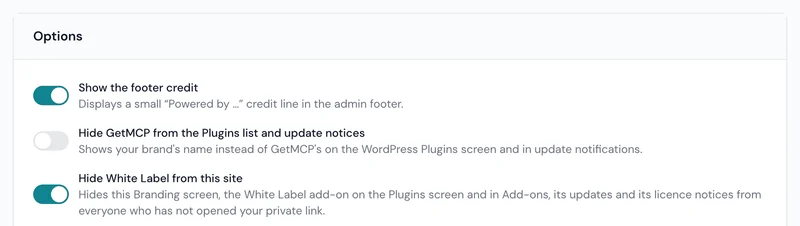
Hide the add-on from your client
A rebranded product still gives itself away if the client can open a Branding screen or find a White Label add-on. Switch on Hide White Label from this site and both disappear for everyone except you.
- Hidden from the menu, Settings → Add-ons and licence notices on both builds
- On WordPress, also from the Plugins screen, its pending updates and the "Required by" line
- Your private link shows everything again in your browser for 30 days; a new link cancels the old one
It hides the add-on in the admin. Someone with access to the server's files or database can still see that it is installed.
From purchase to your brand in four steps
The add-on installs from inside GetMCP. Nothing changes on the site until its licence is connected.
-
Buy
Get a White Label licence
It is separate from your GetMCP plan, and works with any of them.
-
Install
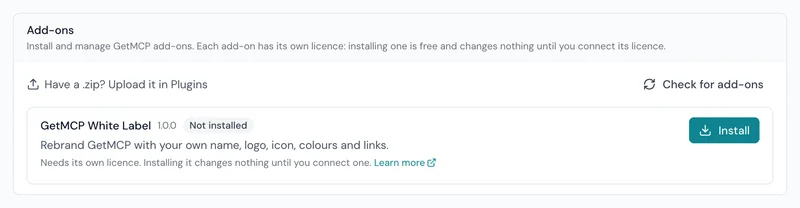
Install it from Add-ons
Open Settings → Add-ons and click Install next to White Label. The right package for WordPress or the standalone app is chosen for you.
-
Connect
Connect its licence
Click Connect licence on the add-on's row or on the Branding screen, and sign in to your GetMCP account.
-
Brand
Fill in Branding and save
Name, logos, icon and colour. Reload any screen and the install is yours.
White Label plans
Every plan includes everything on this page. They differ only in how many installs you can brand.
Rebrand one GetMCP install, on WordPress or the standalone app.
- 1 branded install
- Your name, logos, icon and accent colour
- Your brand on the consent screen and in emails
- Hide the add-on behind a private link
- WordPress and the standalone app
- A year of updates and support
For agencies: rebrand up to 25 client installs under your own name.
- Up to 25 branded installs
- Your name, logos, icon and accent colour
- Your brand on the consent screen and in emails
- Hide the add-on behind a private link
- WordPress and the standalone app
- A year of updates and support
Rebrand every GetMCP install you manage, with no site limit.
- Unlimited branded installs
- Your name, logos, icon and accent colour
- Your brand on the consent screen and in emails
- Hide the add-on behind a private link
- WordPress and the standalone app
- A year of updates and support
Questions about White Label
Which GetMCP plan do I need?
Any of them, including the free Solo plan. White Label has its own licence, and it rebrands whatever your GetMCP plan already includes. It needs GetMCP 1.7.0 or later.
Does it work on the standalone app?
Yes. The standalone app has the same Branding screen and the same options, and installs its own package of the add-on from Settings → Add-ons. The Plugins screen options apply to WordPress only, because the standalone app has no Plugins screen.
Can each client have a different brand?
Each install has one brand. Give each client their own install, on their WordPress site or a standalone app on their subdomain, and brand each one; every branded install uses one activation of your licence.
What happens if the licence ends?
GetMCP goes back to its own name and colours, and anything you hid shows again, so you can always reach the screen to reconnect. Your brand settings are kept, and come back as soon as the licence is renewed or reconnected.
Will my client be able to tell it is GetMCP?
Not from the admin once you hide the add-on. The server files and the database still contain GetMCP's code and names, so anyone with that level of access can find it. The add-on rebrands the product; it does not hide what is installed on the server.
Hand your clients a product with your name on it.
Install White Label from Settings → Add-ons, connect the licence and fill in one screen. Your servers keep running exactly as they are.