An email MCP server for Gmail, Outlook and any IMAP mailbox
Connect a mailbox and your AI client can read, search, file and reply to email, and unsubscribe from the lists you no longer want. Reading is on from the start. Anything that sends, moves or deletes waits for you to switch it on.
Your inbox, as tools your assistant can call
Install the Mailbox template, add the IMAP details and an app password under the server's Mailbox settings, and the server is ready. Hand it to Claude or Cursor with Quick Connect and ask what arrived this morning, which invoices are unpaid, or who is still waiting for a reply.
- Works with any IMAP account, including Gmail and Outlook with an app password
- Credentials are stored encrypted on your server and never sent anywhere else
- Large mailboxes page properly: a question spanning a year of mail works through all of it
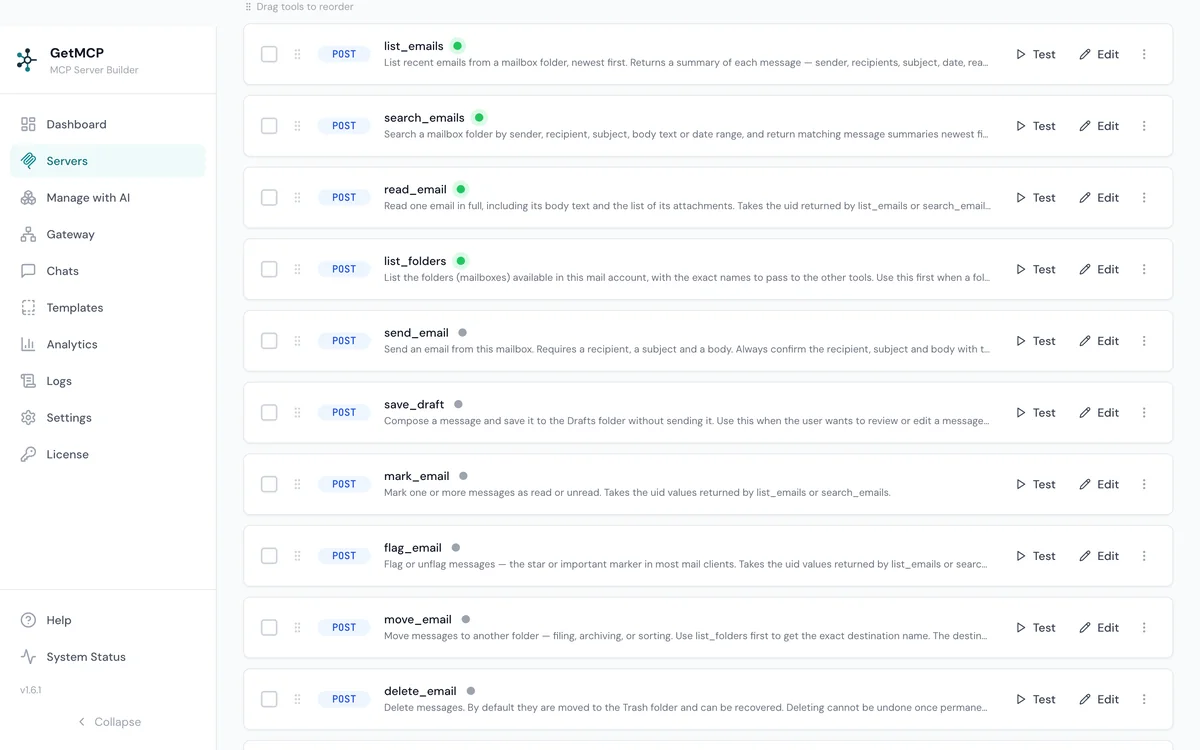
Fifteen tools, five of them on by default
The read tools are live as soon as the mailbox is connected. Everything else installs disabled, and you turn on each one from the Tools screen when a workflow needs it.
| Tool | What it does | On install |
|---|---|---|
| Read | ||
| list_emails | Recent messages in a folder, newest first, as summaries | ✓ |
| search_emails | Search by sender, recipient, subject, body text or date range | ✓ |
| read_email | One message in full, with its body and the list of attachments | ✓ |
| list_folders | The folders in the account | ✓ |
| find_unsubscribe | How to leave the list a message came from, read from the headers the sender published | ✓ |
| Write, off until you enable them | ||
| send_email | Send a message, with cc, bcc, HTML and reply-to-thread support | |
| save_draft | Save a draft instead of sending | |
| mark_email | Mark a message read or unread | |
| flag_email | Flag or unflag a message | |
| move_email | Move a message to another folder | |
| delete_email | Delete a message | |
| create_folder | Create a folder | |
| delete_folder | Delete a folder | |
| unsubscribe_via_link | Complete a one-click unsubscribe the sender committed to honour | |
| send_unsubscribe_email | Email the unsubscribe request for lists that only accept mail | |
The details a mail client gets right
The tools behave the way a person using a mail client would expect, so the conversation and the mailbox stay in step.
Replies land in the thread
A reply references the message it answers, so it threads correctly in every client, and the original is flagged answered the way a mail client would.
Unsubscribe without opening the email
GetMCP reads the route the sender published, completes it in a single call where they support one-click, and emails the request for the lists that only accept mail.
Summaries first, bodies on request
Listing and searching return sender, subject, date, flags and whether there are attachments. The body comes only when a tool asks for one message, which keeps every turn small.
Paging that reports what is left
Listing and searching take an offset and return how many messages matched, whether there are more and where to continue, so a long search does not stop at the first hundred.
Nothing is sent by accident
Sending, moving and deleting install switched off and carry safety hints that tell a client they change the mailbox. A model cannot send on your behalf until you decide it should.
Existing servers pick up new tools
A mailbox server you built on an earlier release is offered the newer tools in place, leaving your connection and the tools you had enabled exactly as they were.
Questions about the mailbox connector
How do I connect Gmail or Outlook?
Both offer IMAP access with an app password: create one in your account's security settings, then enter the IMAP host, your address and that password under the server's Mailbox settings. Your normal password and two-factor setup stay as they are.
Where does my mail go?
Nowhere new. Your server talks to your mail provider over IMAP and returns what the tool asked for to the client. GetMCP, the company, never sees the mailbox or the credentials.
Can I limit what the assistant can do?
Yes, per tool. Leave sending and deleting off and the assistant can only read. Turn on move_email alone and it can file messages but not send. Each tool is a separate switch on the Tools screen.
Can a shared support inbox and my own mailbox be separate servers?
Yes. Each mailbox is its own server with its own credentials, tools and call log, and you can publish any set of them through the MCP Gateway.
Let your assistant read the mail, and nothing more until you say so.
Install the Mailbox template, add an app password, and connect Claude or Cursor in one click.